Last updated · every competitor fact checked against its primary source
The best Shimeji alternative in 2026 is OpenPets, a free, open-source desktop pet app for Windows, macOS, and Linux that runs without Java, supports custom characters, and is actively maintained. If you mainly want to keep your existing shimeji image sets, Shijima-Qt is the best pick.
TL;DR
Want desktop pets that just work? OpenPets installs like a normal app on Windows, macOS, and Linux. No Java, and 1,200+ pets ready in the gallery.
Want to keep your shimeji files? Shijima-Qt runs existing shimeji image sets natively; ShimejiEE-cross-platform is the Mac-friendly Java fork.
Shimeji itself still works on Windows if you're happy managing a Java install. The original is abandoned, but the Shimeji-ee fork lives on.
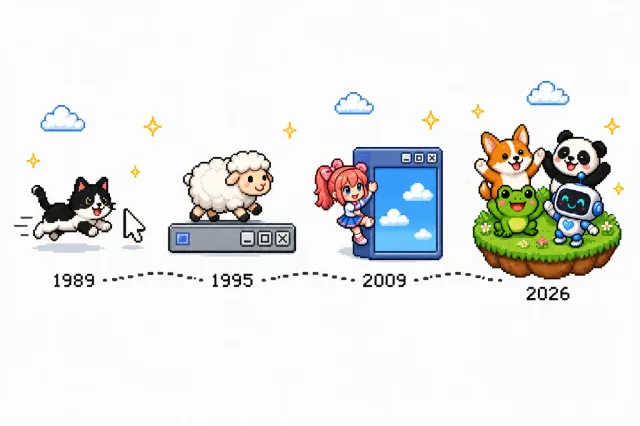
Shimeji is a small Java program that puts animated characters, usually anime-style “mascots”, directly on your desktop. They walk along the taskbar, climb the sides of windows, dangle from your browser, multiply when you're not looking, and occasionally fling your windows around. It was created around 2009 by Yuki Yamada of the Japanese studio Group Finity (the earliest archived copy of the original site dates to June 2009), and it arrived as the modern heir to a long lineage of desktop companions: Neko, the cursor-chasing cat from 1989, and eSheep, the screen-wandering sheep of 1995.
Thirty-seven years of desktop pets: Neko (1989), eSheep (1995), Shimeji (2009), OpenPets (2026).
What made Shimeji special wasn't the program. It was the art community. Because a shimeji is just a folder of numbered PNG frames plus two XML files describing behaviors, thousands of artists on DeviantArt drew their own characters: anime protagonists, vocaloids, original characters, entire matched sets. When the original project went quiet, an English fork called Shimeji-ee picked up the torch, and its maintainer, Kilkakon, still distributes and updates it today. A separate browser-extension spin-off with around a million Chrome users shows how durable the idea is: seventeen years on, people still want little characters keeping them company on screen.
Why people look for an alternative
None of this is a knock on what Shimeji achieved. Very few hobby projects from 2009 still have an active art community. But using it in 2026 means signing up for some genuine friction:
It requires Java. The single most common support question in the Shimeji community is some variant of “it says I don't have Java”. The app needs a working Java runtime, often a specific one, and 32-bit vs 64-bit mismatches can leave you with an invisible mascot and no error message.
It's officially Windows-only. The maintainer's own site states plainly that Shimeji-ee “requires Java and runs only on Windows.” Mac users, especially on Apple silicon, are left to community forks of varying freshness.
The original is abandoned. Group Finity's site is gone (only archives remain), and the project survives thanks to one volunteer maintainer plus scattered GitHub forks. That's fragile ground for something living on your desktop every day.
It can get heavy. Shimejis famously multiply, and a screen full of Java-rendered mascots shows up in your CPU and RAM usage. Old versions of the docs themselves warned about it.
Downloads feel risky. Character packs come from fan sites and decade-old forum threads, so antivirus warnings and “is this safe?” posts are a constant of the community. The app is fine. The distribution story isn't.
If any of that list is why you're here, the comparison below is the short version of your decision.
Before choosing Shijima-Qt on Linux
Shijima-Qt is the practical choice when preserving existing Shimeji sets matters more than changing tools, but its Linux support depends on the desktop session. Read the release notes before committing to it on a multi-display or Wayland setup: the project is archived, so these constraints are unlikely to move quickly.
Shijima-Qt practical constraints
Linux desktop
KDE and GNOME are documented targets.
Wayland
Its backend needs wl-layer-shell and does not support GNOME.
Displays
Multi-monitor use has a documented limitation.
macOS and maintenance
macOS may show a quarantine warning; the repository is archived.
Yes: PNG frame folders + XML, large artist community
Yes, open pet format + Plugin SDK
Multiple pets at once
Yes
Yes
Ready-made pets
Community packs on DeviantArt and fan sites
1,200+ pets in the gallery
Maintained
Original abandoned; Shimeji-ee fork still updated by a community maintainer
Actively maintained
Facts as of July 11, 2026, verified against kilkakon.com/shimeji. Spot something outdated? Tell us and we'll fix it.
The honest summary: Shimeji still wins on one axis: its enormous back-catalog of fan-made anime characters. OpenPets wins on everything that makes a desktop pet livable in 2026: native installs on all three desktop platforms, no runtime dependencies, an open pet format, a curated gallery of 1,200+ pets, and active maintenance.
Other alternatives worth considering
OpenPets isn't the right fit for everyone, and some of these projects are genuinely great at what they do. Here's the rest of the field, honestly assessed:
Shijima-Qt
Windows · macOS · Linux
A modern, open-source (GPL-3.0) rewrite of the Shimeji runner in C++ and Qt with no Java involved. It loads existing shimeji image sets, so if your goal is simply to keep running the characters you already have on a modern machine, this is the most direct answer. Still a young project, so expect rough edges compared with the original's decade of behavior tuning.
A fork of Shimeji-ee focused on making the original Java app run properly outside Windows. It ships macOS builds with a bundled Java runtime, including Apple-silicon support. The closest thing to "real Shimeji on a Mac." It inherits Shimeji's Java architecture, so the classic setup quirks come along with it.
Sam Chiet's 2020 viral hit: an untitled-goose-game-style menace that steals your cursor and drags memes onto your screen. It's a comedy prop more than a companion: one goose, chaos as the whole feature set, and no character customization. Brilliant for a laugh; not a Shimeji replacement if you care about your own characters. See our full Desktop Goose alternatives guide.
An open-source remake of the 1995 Stray Sheep, the app many people are actually remembering when they search for desktop pets. The sheep walks window edges and falls off title bars exactly like it did thirty years ago. Scope is deliberately narrow: a nostalgic sheep, Windows only, with a small set of community animals.
Cats, dogs, snakes, and even Clippy living in a VS Code panel. It's MIT-licensed, actively maintained, and delightful if you spend your day in the editor, but the pets are confined to that panel. They never walk on your actual desktop, which is usually the whole point of a Shimeji.
A minimalist macOS menu-bar cat that runs faster as your CPU load climbs. It's a status indicator with personality rather than a free-roaming pet: no desktop wandering, no custom characters. Lovely alongside a desktop pet app, not instead of one. Bongo Cat fills a similar niche with a keystroke-reactive cat; see our Bongo Cat alternatives guide.
If you're attached to a specific shimeji character, you have two paths.
Keep running it as-is. Shijima-Qt (above) loads standard shimeji image sets on Windows, macOS, and Linux without Java. Point it at your existing character folder and you're done.
Rebuild it as an OpenPets pet. A shimeji ships as a folder of numbered PNG frames (shime1.png through shime46.png in the classic layout) plus actions.xml and behaviors.xml. An OpenPets pet is simpler: one spritesheet image and one small pet.json manifest. To convert a character you own the art for:
Arrange the PNG frames you want to keep into a spritesheet grid (any sprite tool or image editor works).
Describe the animations (idle, walk, drag, sleep) in pet.json following the pet format guide.
Zip the folder and load it locally, or submit it to the public gallery so other ex-Shimeji users can adopt it too.
Only rebuild characters whose art you created or have permission to use. Most DeviantArt shimeji are fan works with their own terms.
Shimeji FAQ
Does Shimeji work on Windows 11?
Yes. The Shimeji-ee fork runs on Windows 11, but you need a working Java installation and a correctly extracted folder first. Java version mismatches (32- vs 64-bit) and archive-extraction mistakes are the most common reasons a shimeji never appears on screen.
Is Shimeji safe to download?
Shimeji-ee itself is open source and has no widespread malware reports. The risk comes from where you download it: stick to the maintainer's official site (kilkakon.com) or known community sources, and scan character packs from fan sites before running them.
Can I run Shimeji without Java?
Not the original: Java is a hard requirement of Shimeji and Shimeji-ee. If you want your shimeji characters without Java, Shijima-Qt is a native rewrite that loads existing shimeji image sets. If you just want desktop pets without Java, OpenPets is a native app with its own pet gallery.
Does Shimeji work on macOS?
Not officially. The maintainer states Shimeji-ee runs only on Windows. On a Mac your options are the community ShimejiEE-cross-platform fork (which bundles Java and supports Apple silicon) or a natively cross-platform pet app like OpenPets.
Can I use my Shimeji characters in OpenPets?
Not automatically yet. A shimeji is a folder of numbered PNG frames, and OpenPets pets are a spritesheet plus a small pet.json manifest, so an artist can rebuild a character by arranging those frames into a spritesheet and following the pet format guide. The open format means nothing about your character stays locked in.
What is the best free Shimeji alternative?
OpenPets, if you want an actively maintained desktop pet app that installs like a normal program on Windows, macOS, and Linux (no Java) with a large pet gallery and an open format for custom characters. If your priority is running existing shimeji files unchanged, use Shijima-Qt instead.