
What this integration does
The Claude Code integration connects Claude to your OpenPets desktop companion. It has one basic install path and two advanced layers you can inspect or customize later.
| Part | Required? | What it gives Claude |
|---|---|---|
| MCP server | Yes | Tools named openpets_status, openpets_react, and openpets_say. |
| Instructions / prompt guidance | Yes | Rules that tell Claude when to use OpenPets and what never to put in visible pet messages. |
| Hooks | Optional | Automatic reactions from Claude lifecycle events, even when Claude does not call an MCP tool. |
All runtime communication is local. Claude starts OpenPets packages, those packages talk to the OpenPets desktop app over local IPC, and the desktop app owns the pet window. If OpenPets is closed, Claude Code keeps working; pet updates are best-effort feedback.
Quick install
In the OpenPets desktop app, open Integrations and use the Claude Code card. This card is for the normal user flow: click Install, restart Claude Code if it was already open, and Claude can start using the OpenPets MCP tools.
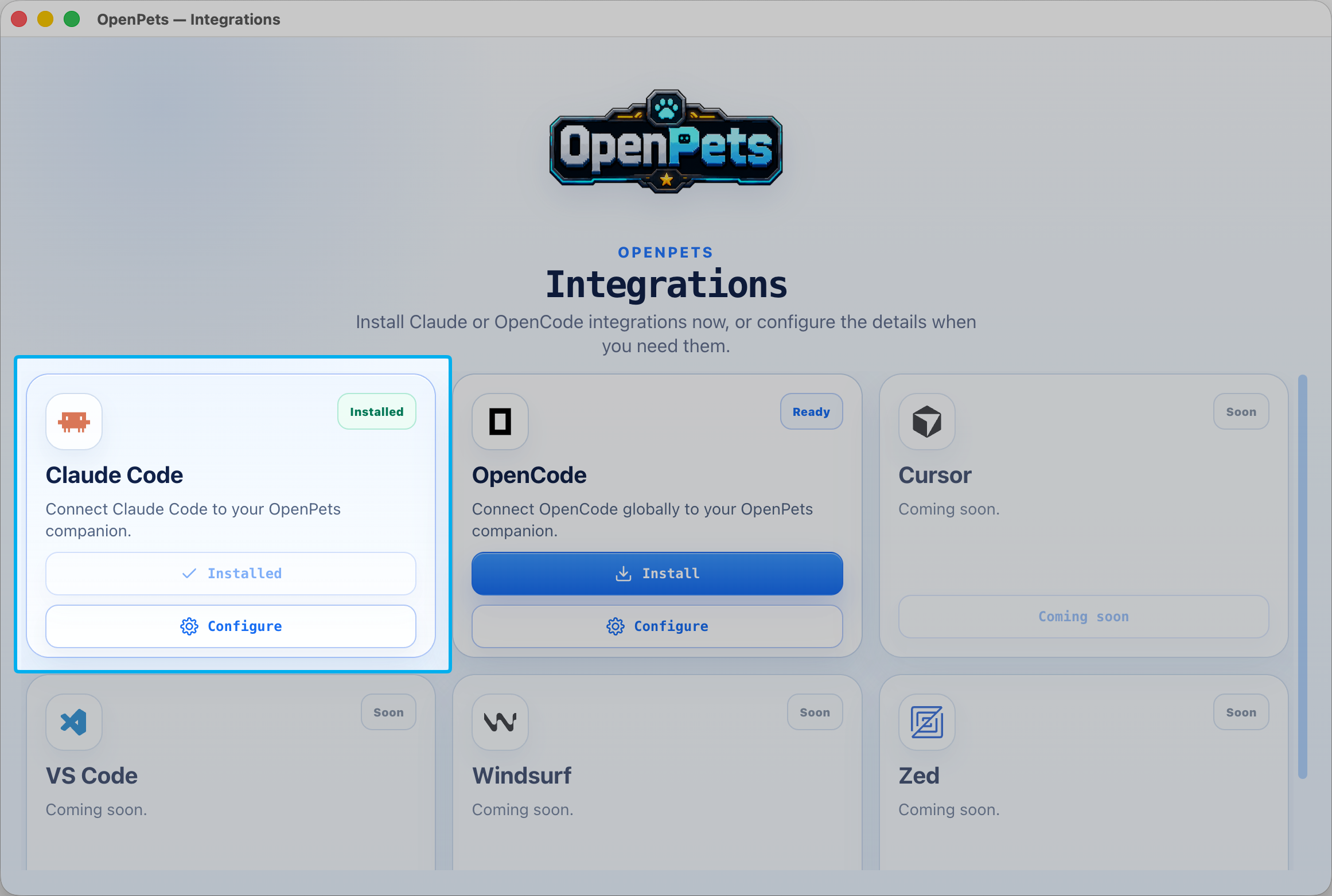
- Install adds the Claude MCP server named
openpetsand updates OpenPets Claude instructions. - Configure opens advanced MCP, instruction, hook, pet routing, and command detection controls.
- Installed means Claude already has an OpenPets MCP connection.
Quick install does not install hooks. Hooks are intentionally separate because they modify Claude Code hook settings and add automatic reactions to Claude events.
MCP connection
MCP is the main Claude-to-OpenPets bridge. OpenPets registers a Claude MCP
server named openpets. After Claude loads it, Claude can call a
small safe tool set whenever it wants to show status on your desktop pet.
| Tool | Purpose | When Claude should use it |
|---|---|---|
openpets_status |
Checks whether the OpenPets desktop app is reachable and which pet is targeted. | Before using OpenPets, or when debugging setup. |
openpets_react |
Changes the pet reaction without showing text. | For silent state changes like thinking, editing, testing, waiting, success, or error. |
openpets_say |
Shows one short visible speech bubble. | For meaningful progress, blockers, completion, or review handoff. |
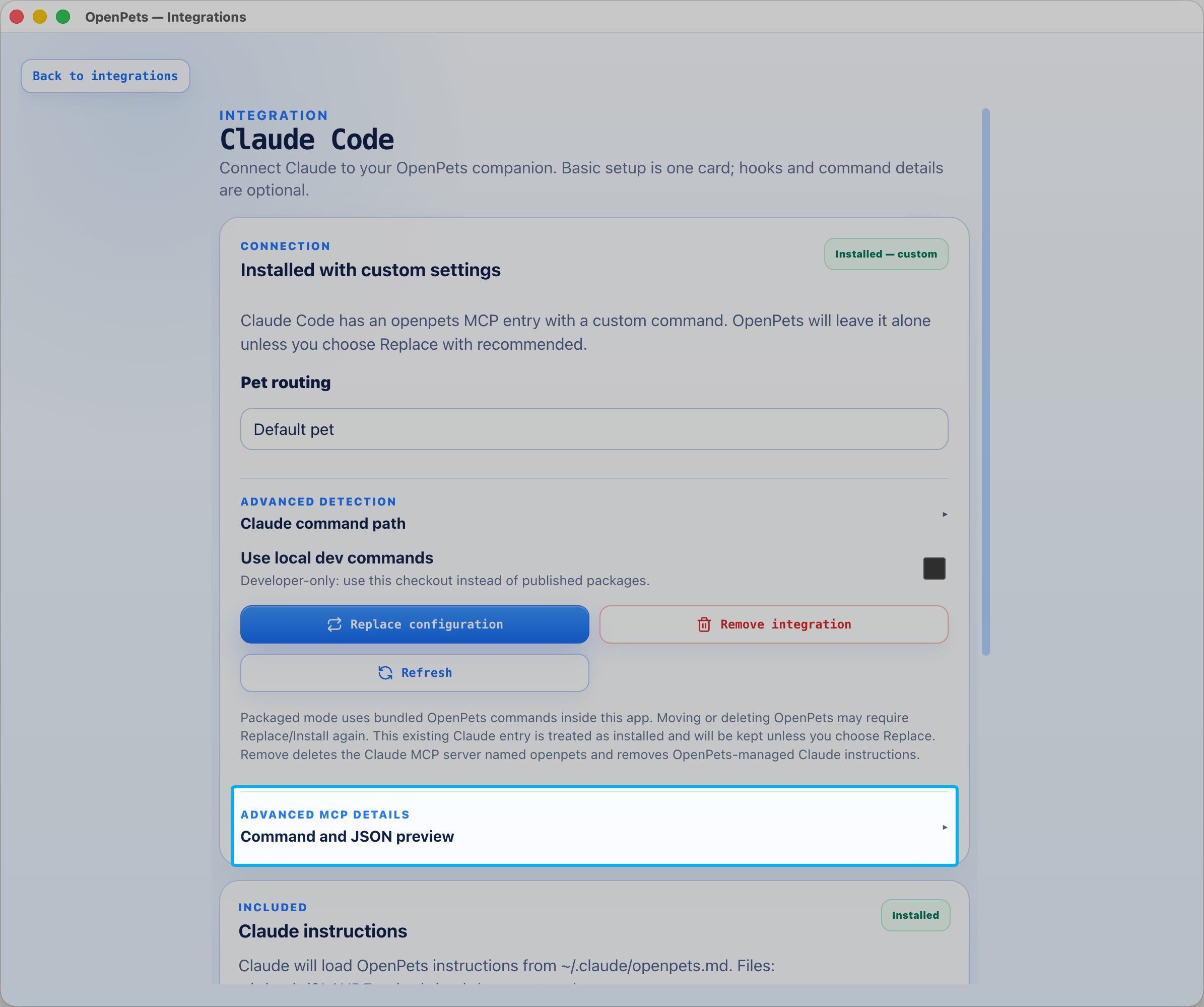
In a packaged desktop build, the advanced MCP JSON preview uses the bundled OpenPets MCP server inside the app:
{
  "mcpServers": {
    "openpets": {
      "type": "stdio",
      "command": "node",
      "args": [
        "/Applications/OpenPets.app/Contents/Resources/app.asar.unpacked/node_modules/@open-pets/mcp/dist/index.js"
      ]
    }
  }
}
In published-package mode, the command is shorter and uses npm:
claude mcp add --scope user openpets -- npx -y @open-pets/mcp@latest --pet <pet-id>Customization ideas
- Select a specific pet in Pet routing to append
--pet <pet-id>. - Use Advanced detection if the
claudecommand is not on PATH. - Use Replace configuration only when you want OpenPets to recreate a custom
openpetsMCP entry. - Use the JSON preview if you want to audit exactly what Claude will run.
Claude instructions / prompt guidance
MCP gives Claude the tools. Instructions tell Claude how to use those tools without leaking private context into a visible desktop bubble. This is why basic install writes a managed OpenPets instruction file.
OpenPets writes its guidance to ~/.claude/openpets.md and adds
one managed import to ~/.claude/CLAUDE.md. Existing Claude
instructions are preserved.
<!-- OPENPETS:IMPORT:START -->
@~/.claude/openpets.md
<!-- OPENPETS:IMPORT:END --><!-- OPENPETS:START -->
## OpenPets
OpenPets MCP tools may be available.
Use OpenPets as a short visible status channel for meaningful coding progress:
- Use `openpets_say` when starting, completing, blocking, or needing review on non-trivial work.
- Keep messages brief, user-facing, and non-sensitive.
- Do not include code, logs, secrets, URLs, or file paths.
- Use `openpets_react` for small visual or emotional feedback.
- Use `openpets_status` only when checking availability or the targeted pet.
- Do not spam every internal step.
<!-- OPENPETS:END -->Message style
| Good pet message | Avoid |
|---|---|
Checking the next step. | Private file paths or repo structure. |
Tests are running. | Raw command output or logs. |
Waiting for approval. | User prompts, secrets, tokens, or URLs. |
Ready with the result. | Code snippets or exact stack traces. |
Customization ideas
- Add your own team style rules outside the OpenPets managed block in
CLAUDE.md. - Keep the OpenPets block focused on privacy and short status messages.
- If you remove OpenPets later, the managed import and managed block can be removed cleanly.
Optional Claude hooks
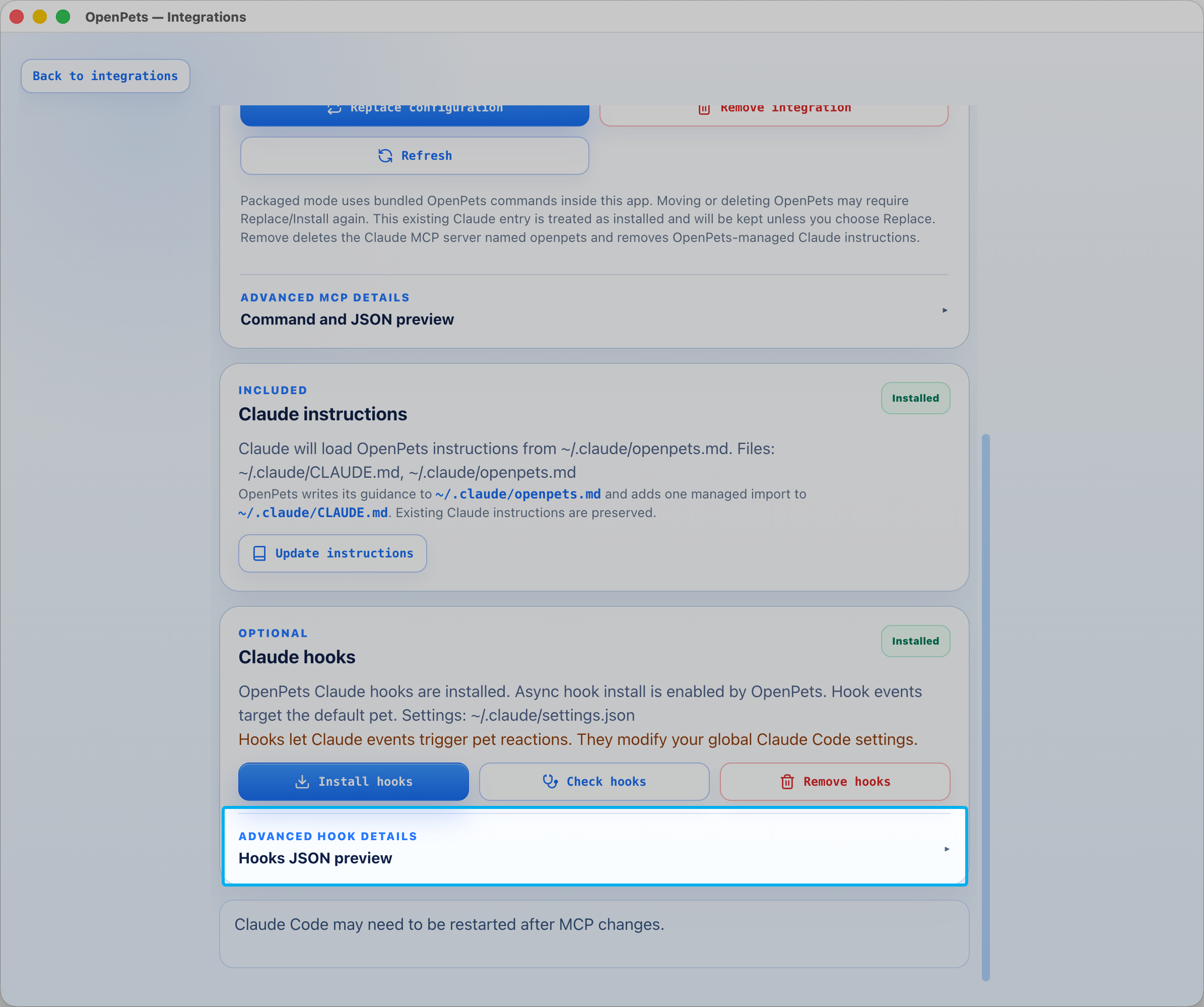
Hooks are optional automation. They let Claude lifecycle events trigger pet reactions without Claude explicitly calling an MCP tool. Install them only if you want the pet to react automatically while Claude works.
| Claude event | When it fires | Pet reaction | Speech |
|---|---|---|---|
UserPromptSubmit | User submits a prompt. | thinking | None |
PreToolUse | Edit, Write, or MultiEdit. | editing | None |
PreToolUse | Bash command looks test-like. | testing | None |
PermissionRequest | Claude asks for approval. | waiting | Short approval message |
Notification | Claude emits a notification. | None | None |
Stop | Claude finishes a response. | success | None |
StopFailure | Claude finalization fails. | error | Short error message |
Hook commands are marked with --openpets-managed. OpenPets uses
that marker to update or remove only its own hooks while leaving unrelated
Claude Code hooks alone.
Lifecycle status bubbles
When hooks are installed, OpenPets can add a compact status header to the pet bubble. Status-only events show a small colored pill, while approval or error messages can show the status row, a divider, and the message in one unified bubble.
- Working status appears for prompt, edit, and test activity.
- Waiting status appears when Claude asks for approval.
- Done status appears when Claude sends
Stop. - Error status appears when Claude sends
StopFailure.
Hook status is best-effort local feedback. Claude Code continues normally if OpenPets is closed, hook events are throttled to avoid spam, and speech remains privacy-scoped by the same message validation rules.
{
  "hooks": {
    "UserPromptSubmit": [
      {
        "hooks": [
          {
            "type": "command",
            "command": "node /Applications/OpenPets.app/Contents/Resources/app.asar.unpacked/node_modules/@open-pets/claude/dist/cli.js hook --openpets-managed",
            "timeout": 3,
            "async": true,
            "asyncRewake": false
          }
        ]
      }
    ],
    "PreToolUse": [
      {
        "hooks": [
          {
            "type": "command",
            "command": "node /Applications/OpenPets.app/Contents/Resources/app.asar.unpacked/node_modules/@open-pets/claude/dist/cli.js hook --openpets-managed",
            "timeout": 3,
            "async": true,
            "asyncRewake": false
          }
        ]
      }
    ],
    "PermissionRequest": [
      {
        "hooks": [
          {
            "type": "command",
            "command": "node /Applications/OpenPets.app/Contents/Resources/app.asar.unpacked/node_modules/@open-pets/claude/dist/cli.js hook --openpets-managed",
            "timeout": 3,
            "async": true,
            "asyncRewake": false
          }
        ]
      }
    ],
    "Notification": [
      {
        "hooks": [
          {
            "type": "command",
            "command": "node /Applications/OpenPets.app/Contents/Resources/app.asar.unpacked/node_modules/@open-pets/claude/dist/cli.js hook --openpets-managed",
            "timeout": 3,
            "async": true,
            "asyncRewake": false
          }
        ]
      }
    ],
    "Stop": [
      {
        "hooks": [
          {
            "type": "command",
            "command": "node /Applications/OpenPets.app/Contents/Resources/app.asar.unpacked/node_modules/@open-pets/claude/dist/cli.js hook --openpets-managed",
            "timeout": 3,
            "async": true,
            "asyncRewake": false
          }
        ]
      }
    ],
    "StopFailure": [
      {
        "hooks": [
          {
            "type": "command",
            "command": "node /Applications/OpenPets.app/Contents/Resources/app.asar.unpacked/node_modules/@open-pets/claude/dist/cli.js hook --openpets-managed",
            "timeout": 3,
            "async": true,
            "asyncRewake": false
          }
        ]
      }
    ]
  }
}
Customization ideas
- Use hooks when you want ambient reactions for every Claude session.
- Skip hooks if you only want Claude to use OpenPets intentionally through MCP tools.
- Choose a pet in routing before installing hooks if you want hook events to target a specific companion.
- Run Check hooks after updating Claude Code or moving the OpenPets app.
Pet routing and customization
Without a selected pet, Claude targets the OpenPets default pet. With a
selected pet, OpenPets adds --pet <pet-id> to the MCP and hook
commands so Claude targets that companion.
Claude Code
  -> OpenPets MCP server or Claude hook CLI
  -> @open-pets/client
  -> OpenPets desktop local IPC
-> default pet or selected agent pet- No selected pet: MCP tools and hooks target the desktop default pet.
- Selected pet: commands include
--pet <pet-id>. - Explicit pet sessions use short leases so agent pets clean up automatically.
- If a requested pet is missing or unavailable, OpenPets falls back safely instead of breaking Claude.
Safety and behavior
OpenPets is designed for visible status, not private transcript output. It keeps messages small, avoids sensitive content, and makes hook failures non-blocking.
| Protection | Behavior |
|---|---|
| Managed instructions | Tell Claude to avoid code, logs, URLs, file paths, secrets, and user prompts in pet speech. |
| Speech validation | Rejects unsafe-looking text before it reaches the desktop pet. |
| Hook stdout | Hook commands stay quiet so Claude does not ingest accidental context. |
| Hook errors | Ignored by default so pet issues do not break Claude sessions. |
| Cooldowns | Repeated hook speech and reactions are throttled to avoid spam. |
| Safe writes | OpenPets refuses unsafe symlink or non-regular file targets before editing Claude files. |
How the layers work together
Claude Code uses the MCP tools and managed instructions as the standard setup:
the tools provide deliberate pet updates, while the import from
~/.claude/openpets.md into CLAUDE.md supplies the
safety guidance. Hooks are a separate, optional layer. OpenPets marks its
hook commands so it can maintain only its own entries, and treats hook
feedback as non-blocking. See the Claude Code hooks documentation for Claude's hook model, or use the
Troubleshooting
Claude does not show OpenPets tools
- Restart Claude Code after installing or replacing MCP configuration.
- Open the Claude detail page and click Refresh.
- Run
claude --versionin a terminal to confirm Claude is available. - Inspect the entry with
claude mcp listandclaude mcp get openpets. - If Claude is installed in a custom location, add its full path under Advanced detection.
OpenPets says the MCP entry is custom
A custom entry means Claude already has a server named openpets,
but its command does not exactly match the current OpenPets recommendation.
OpenPets leaves it alone. Choose Replace configuration only
if you want the desktop app to recreate it.
The pet does not react to hooks
- Confirm the OpenPets desktop app is running.
- Confirm hooks are installed from the optional Claude hooks card.
- Check that hook commands contain
--openpets-managed. - Remember that most hook events are reaction-only and intentionally silent.
Remove or reset everything
Use Remove integration to remove the Claude MCP server named
openpets and OpenPets-managed Claude instructions. Use
Remove hooks separately if you installed optional hooks.